Observation 1. Of the pith of a stem
One click outlines it and names it as a best guess: “pith, Probably”. Ask about the cells around it, and the answer comes in the chat.
Real time, 24 seconds.
Every observer, with a staff of researchers and models, ready at the speed of technology.
A microscopy workspace for the Mac: open your microscope images and recordings, outline and measure what is in them with models that run on your Mac, and keep each result with the model and settings that made it.
Open source, for the community. To discover new worlds hidden in the existing.
Free, for Macs with Apple silicon and macOS 14 or later. Trying the bundled example needs no account, key or camera.
The sky is the 1,523 cells Cellpose-SAM found in a real stained plant stem, each in its stain’s colour. The names are entries in Hooke’s catalog. “You” is made from a USDA photograph of Ruth Colvin Starrett, a cytologist who studied plant cells (Smithsonian Institution Archives).
Find it in the catalog or paste its link. Download it, add a key or turn it on: no terminal, nothing to break.
Outline, measure and follow on your live camera, recordings and images, with the model named on every step.
The app measures, the models propose, and only you confirm. Then share it back, so the next observer starts where you left off.
He published his drawings, so anyone with a lens could look for themselves. We build Hooke in the open for the same reason.
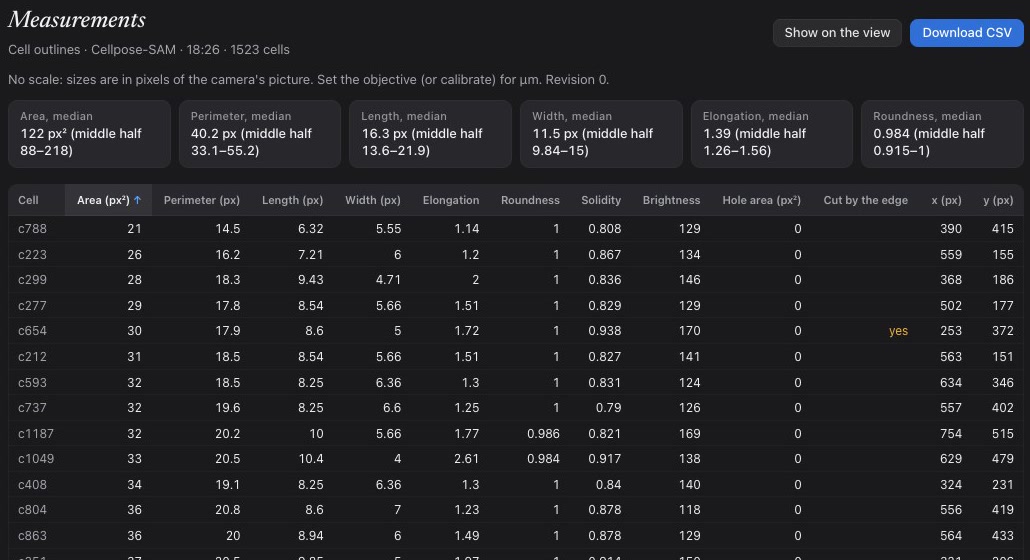
This is a plant stem, today. Cellpose-SAM outlined all 1,523 of its cells in about 20 seconds on a Mac, and the app measured every one. Point at a cell to see what it found.
1,523 cells. Point at one.
HookeUI’s own code will be Apache 2.0, with a sign-off on every contribution. The licence is being finalised for the first release.
Every result keeps the model, version and settings that made it. Share a picture and it names them, so anyone can turn on the same ones and look again.
Add a model, an example or a fix. Share it as a file, or publish it to the reviewed catalog for everyone. The forum opens with the first release.
Hooke numbered his. Ours were made in the app, on footage from a real microscope, with nothing staged or sped up.
One click outlines it and names it as a best guess: “pith, Probably”. Ask about the cells around it, and the answer comes in the chat.
Real time, 24 seconds.
Ask for the cells, and Cellpose-SAM outlines all 1,523. The app measures each one into a table you can sort and download.
About 20 seconds on an Apple silicon Mac; the clip is shortened while it runs. See the measurements.
Click it once. EdgeTAM outlines it, and the outline follows it through the drop, drawing the path it swam.
Sperm wet mount. Its name is a vision model’s best guess, marked “Probably” until you confirm it.
“How fast are they swimming?” It tracked 527 moving spots for 4 seconds: 153 swimming, at a median 13 pixels a second, in pixels because no scale was set.
Asked earlier, while the slide drifted, it said it couldn’t measure yet, and why.
The bundled example opens a real microscope image, finds its bright regions and measures them. No account, key, download or camera.
Human mitosis by David Root, CC0, via scikit-image. A bright region isn’t necessarily one cell.
Behind every name are people who spent years teaching a model to see one thing well. Hooke brings their work a click from your microscope, and names it on every result it helps make.
On your Mac
On your Mac
Each runs headless in a pinned Fiji, proven to match the same ImageJ macro.
On your Mac
With your key, and on your Mac
When someone adds an entry, everyone gets it as a catalog update, with no new app. Add your own from a BioImage Model Zoo or Hugging Face link, drop in a Cellpose model you trained, or have an AI assistant draft its adapter, tried in a sandbox before you use it. Each entry keeps its own licence, shown before you turn it on. Please cite the ones you use.
Hooke is a signed Mac app for Apple silicon. Install it with Finder; no terminal or developer tools.
The example and the local models need no key. Chat, voice and naming use a cloud provider, with your own key.
Installation details and current limits are on the download page. The source code is published on GitHub with the first public release.